Click on the button to watch a video on this issue
A downloadable PDF Troubleshooting Card
is available in the description of the vide
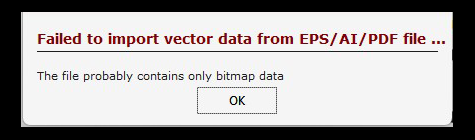
Failure to Import Vector Data (EPS / AI / PDF)
This error means Vectric cannot read or process the vector shapes in the file. It usually occurs when the artwork contains graphic design elements—such as raster images, complex fills, excessive nodes, or unsupported effects—that prevent clean vector data from being created. Vectric requires simple, well-defined paths to generate toolpaths accurately.
Common Causes
- Embedded raster (bitmap) images instead of true vectors
- Overlapping paths, filled shapes, or overly complex geometry
- Unsupported effects or newer AI/EPS file versions
How to Fix
- Open the file in Illustrator or Inkscape and remove fills, effects, and embedded images
- Simplify paths and reduce unnecessary nodes
- Save as a legacy AI/EPS, or export as SVG or DXF for better compatibility
Key Point:
Clean, simple vector outlines are essential for successful imports and reliable machining in Vectric.