Click on the button to watch a video on this issue
A downloadable PDF Troubleshooting Card
is available in the description of the video
Code 506 Overview
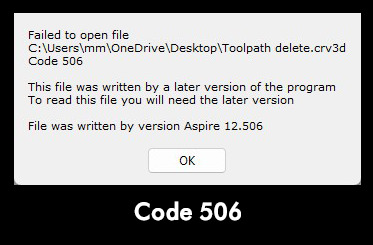
This code is for the Vectric development team and is really just because the software is getting to a different point than the Code 102 before it hits a bit of code in the file which it can’t understand.
Code 102 and 506, relevant to the development team, in most cases this error should appear unexpectedly but in a case where you are doing something that is known to not work , such as opening a new file in an older version.
Similar to Code 102. this error occurs when a file you are trying to open was created or saved in a newer version of the software than the one you are currently using. Older versions may not recognize new features or file structures, so the file cannot be opened.
Common Causes:
- File created in a newer version of the program.
- Attempting to open the file in an outdated or incompatible version.
- File may have been updated or modified in a way that older versions don’t support.
Troubleshooting Steps:
- Check Version Compatibility – Confirm the version of the software that created the file.
- Update Your Software – Install the latest version of the program to match or exceed the version used to create the file.
- Request Compatible File – If possible, ask the file creator to save it in a format compatible with your version. Some programs allow saving as “legacy” or “backward-compatible” formats.
- Use Conversion Tools – Some applications provide tools to convert newer files to older formats. Check the software’s official documentation.