Click on the button to watch a video on this issue
A downloadable PDF Troubleshooting Card
is available in the description of the video
Issue
Unexpected number of passes, uneven step-downs, or cuts that are too aggressive or too shallow.
What This Means
Pass Depth defines the maximum amount of material a tool can remove in a single pass.
It directly controls how many Z-level passes are created for a toolpath.
Example
- Pocket depth: 1.0 in (25.4 mm)
- Tool Pass Depth: 0.25 in (6.35 mm)
- Result: 4 cutting passes
Pass Depth values should be chosen based on:
- Machine rigidity
- Material hardness
- Tool manufacturer recommendations
Pass Depth Control (Automatic Adjustment)
By default, Vectric uses the Pass Depth defined in the selected tool.
To reduce machining time, the software may automatically adjust the actual step-down by up to ±15% if doing so allows fewer total passes.
Why this happens
- Fewer passes = faster machining
- The ±15% adjustment is usually safe for most materials and machines
The Passes section of the toolpath settings shows how many passes will be created.
When Exact Control Is Needed
Automatic step-down adjustment may not be desirable when cutting:
- Laminated materials
- Veneered surfaces
- Fragile or layered materials
In these cases, precise pass control helps prevent tear-out or layer separation.
How to Fix / Adjust
- Review the Pass Depth setting for the selected tool
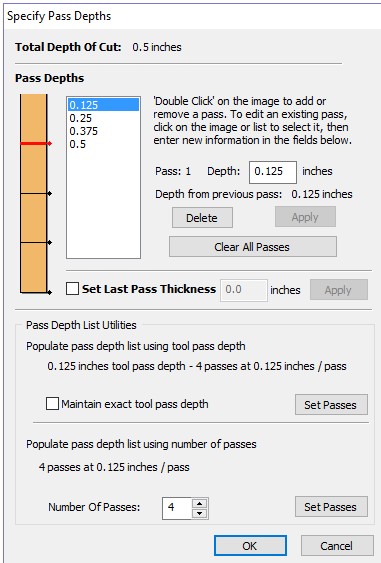
- Click Edit Passes… to:
- Disable automatic step-down variation
- Set the exact number of passes
- Define the exact depth of each pass
- Recalculate the toolpath after making changes
Tip
If your cut quality or material integrity is critical, manually controlling pass depth is often worth the extra machining time.