Click on the button to watch a video on this issue
A downloadable PDF Troubleshooting Card
is available in the description of the video
Visible Toolpath Not Saved
Message Meaning
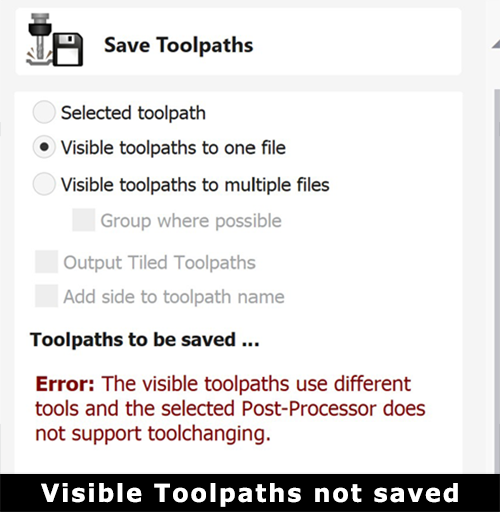
The “Visible Toolpath Not Saved” message indicates that Vectric was unable to export the selected toolpath(s) to a G-code file. This usually occurs when the selected toolpaths are incompatible, the post-processor is incorrect, or the toolpath itself is invalid.
Common Causes and Fixes
Mixed Tools Selected
- Cause: When using “Visible Toolpaths to One File,” all selected toolpaths must use the exact same tool and settings.
- Fix: Save toolpaths individually or group only those that use the same bit into one file.
Toolpath Not Visible or Selected
- Cause: The toolpath is hidden or not selected at save time.
- Fix: Verify the desired toolpaths are checked (visible) and selected in the Toolpath List.
Result
Once compatible toolpaths are selected, the correct post-processor is chosen, and all toolpaths are valid and calculated, the G-code file will save successfully.