Click on the button to watch a video on this issue
A downloadable PDF Troubleshooting Card
is available in the description of the video
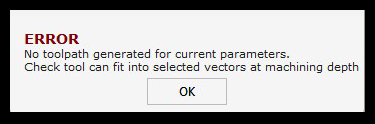
Issue
The tool cannot fit based on the current Offset Allowance setting.
What This Means
This error is related to the Offset Allowance value used in several Vectric toolpath options. The value entered may be too large or too small for the selected tool and geometry.
What to Check
- Review the Offset Allowance value entered in the toolpath settings
- Confirm the tool diameter matches the geometry being machined
- Check for tight corners, narrow areas, or small features in the vectors
- Verify the correct tool is selected for the operation
How to Fix
- Reduce or adjust the Offset Allowance value
- Select a smaller tool if the geometry is too tight
- Modify or simplify the vector geometry if necessary
- Recalculate the toolpath after making changes
Tip
If the offset value is larger than the available space for the tool, the toolpath will fail. Adjust the offset or tool size until the tool can fit properly.